

• Skip to primary navigation
  • Skip to main content
  • Skip to primary sidebar
  • Skip to footer
onecreativemommy.com
  • DIY/Crafts
    • DIY for the Home
    • DIY for the Garden
    • Crafts for Kids
    • Sewing Projects
    • Felt Food Tutorials
  • Parties/Gifts
    • All Party Ideas
      • Frozen Party
      • Harry Potter Party
      • Spy Party
      • Un-Slumber Party
      • Minion Party Ideas
      • Art Party
      • Princess Party
    • All Gift Ideas
  • Holidays
    • Valentine's Day
    • Halloween
    • Christmas and Winter
    • Thanksgiving and Fall
    • Fourth of July
    • New Year
    • Easter and Spring
    • St. Patrick's Day
    • Mother's Day
    • Father's Day
  • Recipes
    • Gluten Free
  • Tips & Tricks
    • Organization Tips
    • Cleaning Tips
    • Parenting Tips
    • Back to School
    • Cooking Tips
    • Gardening Tips
  • Printables
    • Bingo Games
    • Lunchbox Printables
    • Educational Games
    • LDS Printables and Lesson Ideas
  • Navigation Menu: Social Icons

menu icon
go to homepage
subscribe
search icon
Homepage link
  • Home
  • DIY & Crafts
  • Parties & Gifts
  • Holidays
  • Recipes
  • Tips & Tricks
  • Printables
×
NEWSLETTER | SUBSCRIBE |
🔍 SEARCH
Home » Tips & Tricks » Blogging Tips

You won't believe this easy set up for white background photography!

Published: Jan 29, 2021 by Heidi. This post may contain affiliate links 2 Comments

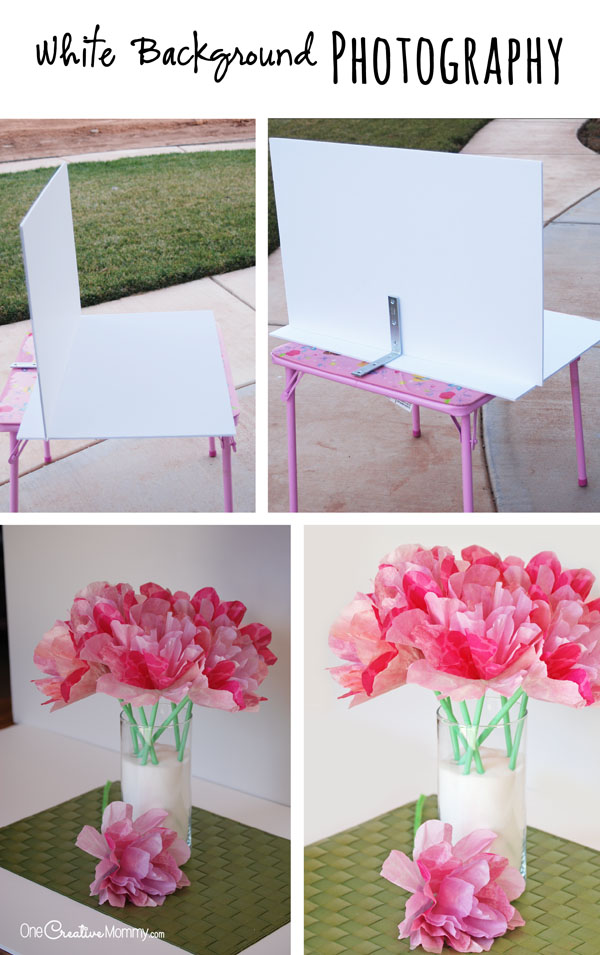
Have you ever wondered how bloggers and photographers get such gorgeous black or white background photography? Lighting is the key, but before you get the lighting right, you have to have a good set up. I've been propping up white foam core for months (and chasing it when the wind blows it off my table).  No more propping.  I just finished the easiest photography set up ever.  And the best part? It stores flat! No bulky mess to store.

Create Black & White Photography like the pros with this simple and inexpensive set up! {OneCreativeMommy.com}

RELATED: DIY Photo Light Box Tutorial

Seriously, when you see how simple this is, you're going to slap yourself on the forehead, and say, "Why didn't I think of that?"  It's so easy!  Ready?  You only need three things, and they're easy to find.
Create Black & White Photography like the pros with this simple and inexpensive set up! {OneCreativeMommy.com}

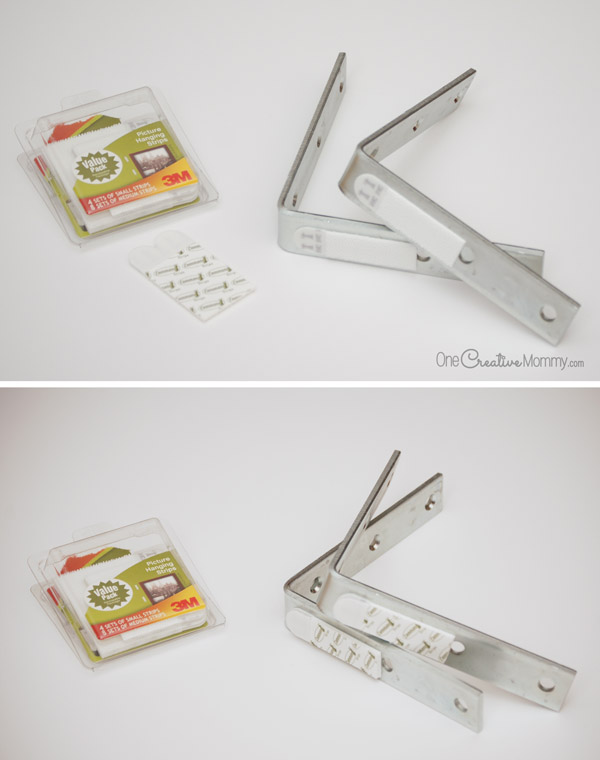
  1. Two pieces of white foam board (or black for a black background).
  2. Velcro picture hanging strips (Have you used these before? They're so awesome!  Seriously.  Everything on my walls is hung with velcro.  No more nail holes!)
  3. One large plastic or metal L bracket.  Mine is 6" x 1-⅛" (You can pick it up at any hardware store.)  It costs a few dollars, but it is so worth it! You'll notice that all of my pictures have two brackets in them.  That's because I thought I'd need two.  Nope.  One is plenty.

That's all you need! Here's how to create the setup:

  1. Attach one set of velcro strips to the L bracket as shown. That's one strip stuck to the bracket and one strip velcroed (is that a word?) to the first strip.
  2. Next, peel the plastic off of the second strip to reveal the adhesive. Lay your foam core on a flat surface, and line the L-bracket up so that the bend in the L is level with the bottom center of the foam core.
  3. Press the L-bracket down to adhere the velcro strip to the foam core.
  4. Wait a little while, and then carefully pull the L-bracket off of the foam core. One piece of velcro should remain on the foam core, and the other should remain on the L-bracket.

Now, find some good lighting, stage your photo, and get to work! I use this method when I really want my subject to pop without too many distracting props. I love the way white background photography highlights the subject, and I love the way black background photography gives the subject a dramatic look. How about you?  Which style do you prefer?
Create Black & White Photography like the pros with this simple and inexpensive set up! {OneCreativeMommy.com}

Since I am horrible at using my camera and finding good lighting, I still have to do quite a bit of editing in Photoshop. You can see examples of the before and after photoshop pics in the examples above and below this paragraph. My favorite tools for editing in Photoshop are the shadows/highlights feature, the screen feature, and the soft paintbrush.
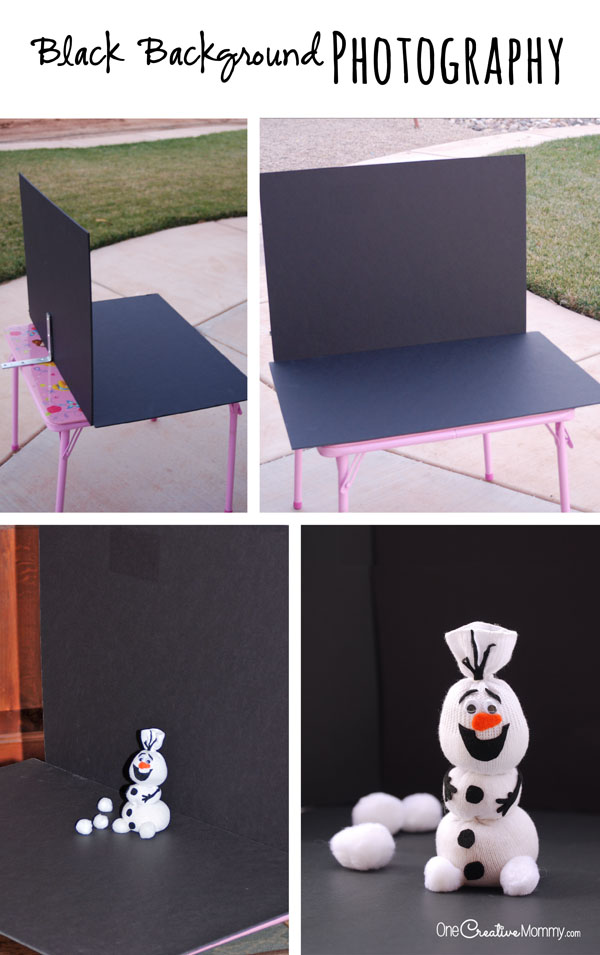
Create Black & White Photography like the pros with this simple and inexpensive set up! {OneCreativeMommy.com}

Thanks for stopping by today, and good luck with your photography. If you are interested in visiting any of the posts in the featured image, check out the links below.

Gorgeous Coffee Filter Flowers Tutorial

Olaf Sock Snowman Tutorial

Felt Pumpkins Sewing Tutorial

Best Ever Orange Raspberry Cream Cheesecake Brownies {Gluten Free}

{I'm Stuck on You} -- Free Printable Valentines

Frozen Fever Snowgies Kids Craft

Heidi


More Blog

  • Homemade Halloween decorations and pumpkin carving in a bright kitchen
    Nostalgic Halloween: Simple Ways to Bring Back the Halloween Magic
  • Framed weekly planner printable filled in with a blue dry-erase marker for organizing appointments, meals, tasks, and groceries.
    The Home Hub: A Simple Printable System to Organize Your Week
  • UGEE Funbox 3D printer for kids with finished 3D printed toys
    UGEE Funbox 3D Printer Review: Is It Really Easy Enough for Kids?
  • End-of-summer home reset with summer gear organized in a bright entryway before fall.
    A Simple End-of-Summer Reset for Your Home

MORE IDEAS FOR YOU

  • Recipes
  • DIY & Crafts
  • Holidays
  • Parties & Gifts
  • Printables
  • Tips & Tricks

Reader Interactions

About Heidi

Hi! I’m Heidi, the sometimes scatterbrained, but always creative mind behind One Creative Mommy. I'm a retired teacher, wife, and mom of three beautiful teenage girls and one adorable fur baby. In my spare time, I love to share my ideas (mistakes and all) with anyone who will listen.

Learn more about me →

Comments

  1. Kate

    April 22, 2015 at 3:16 am

    Thanks for sharing this simple tutorial. I've been trying to fine-tune my photography backgrounds.

    Reply
    • Heidi

      April 22, 2015 at 10:13 pm

      You're welcome, Kate. I hope this helps. Now I just have to learn my camera so that I don't have to do some much editing!

      Reply

Leave a Reply Cancel reply

Your email address will not be published. Required fields are marked *

Recipe Rating


Primary Sidebar

Headshot of Heidi, owner of One Creative Mommy and All Things Lovely

Hi! I’m Heidi, the sometimes scatterbrained, but always creative mind behind One Creative Mommy. I’m a retired teacher, wife, and mom of three beautiful girls and two adorable fur babies. In my spare time, I love to share my ideas (mistakes and all) with anyone who will listen.

More about me →

Save Money

Footer

Privacy Policy

Footer

↑ back to top

About

  • Privacy Policy
  • Printables Terms of Use

Newsletter

  • Sign Up! for emails and updates

Contact

  • Contact

As an Amazon Associate I earn from qualifying purchases.

Copyright © 2022 OneCreativeMommy